# Understanding Logs: Deep Dive into eth_getLogs
> This is a beginner-friendly guide into the commonly used eth_getLogs JSON-RPC call and understanding logs on Ethereum. It discusses some key topics and goes into the complexities and usage of eth_getLogs through an example.
> For the complete documentation index, see [llms.txt](/docs/llms.txt).
# Understanding Logs: Deep Dive into eth\_getLogs
This is a beginner-friendly guide into the commonly used eth\_getLogs JSON-RPC call and understanding logs on Ethereum. It discusses some key topics and goes into the complexities and usage of eth\_getLogs through an example.
New to `eth_getLogs` or want to learn more information about it? You are in the right place. `eth_getLogs` has many beneficial use cases that developers are often times unaware of. It also has some extreme vulnerabilities that can have huge consequences if you don't use it correctly. This page is a deep dive into the capabilities of `eth_getLogs` to help you improve your usage and understanding of this method! For details about the request/response specifications for `eth_getLogs`, check out our [JSON-RPC reference page](/docs/reference/eth-getlogs).
The best way to understand logs is through an example, but before we jump into the example there are a few things you need to understand:
* [What is `eth_getLogs` Used for?](#what-is-eth_getLogs-used-for?)
* [What are Logs or Events?](#what-are-logs-or-events?)
* [What are Transfers?](#what-are-transfers)
* [Why use logs?](#why-use-logs)
* [What are ABIs](#what-are-abis?)
* [What are Event Signatures?](#what-are-event-signatures)
***
# What is `eth_getLogs` Used for?
`eth_getLogs` allows you to view events that occurred on the blockchain.
A core part of Web3 or decentralized applications (dApps) is the ability to understand when and what events happen on a blockchain. These events can trigger updates or notifications within the application that are then communicated to users. To allow users to easily access data about these events from outside of the blockchain, the [Ethereum Virtual Machine (EVM) ](https://www.alchemy.com/overviews/what-is-the-ethereum-virtual-machine-evm)keeps an event log on the transactions of every block. To be able to read and understand these logs, we use the `eth_getLogs` JSON-RPC method.
***
# What are Logs or Events?
Logs and events are used synonymously—smart contracts generate logs by firing off events, so logs provide insights into events that occur within the smart contract. Logs can be found on transaction receipts.
Anytime a transaction is mined, we can see event logs for that transaction by making a request to `eth_getLogs` and then take actions based off those results. For example, if a purchase is being made using crypto payments, we can use `eth_getLogs` to see if the sender successfully made the payment before providing the item purchased.
***
# Why use logs?
An advantage of using event logs is that they are cheap compared to other functions of the EVM. This information can be read outside applications, and that data can then be used to perform an action, like updating a front-end.
***
# What are ABIs?
Contract Application Binary Interface (ABI) is the interface that specifies how to interact with a specific Ethereum contract. This includes the method names, parameters, constants, data structures, event types (logs), and everything else you need to know about the contract.
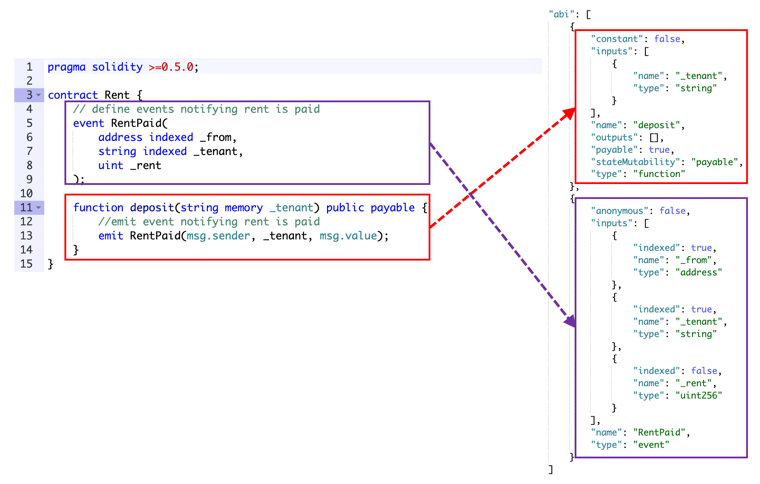
Source: [https://static.packt-cdn.com/products/9781789954111/graphics/assets/fe0f2ffc-2f3c-4615-9cb5-43c8e036239b.png](https://static.packt-cdn.com/products/9781789954111/graphics/assets/fe0f2ffc-2f3c-4615-9cb5-43c8e036239b.png)
Every contract has an associated ABI, if you use [Truffle](https://www.trufflesuite.com) to deploy contracts, the ABI is automatically generated for you.
You can find the ABI for a specific contract by going to [Etherscan](https://etherscan.io) and pasting in the `address` field of the contract in the search bar, then clicking on the "contract" tab and scrolling down to "Contract ABI".
Here is part of the contract ABI for the contract with address `0xb59f67A8BfF5d8Cd03f6AC17265c550Ed8F33907`, which we will be using in our example. Here we have just included the two `events` listed in this ABI: the `"Transfer"` event, and the `"NewOwner"` event, but you can see the full contract ABI [here](https://etherscan.io/address/0xb59f67a8bff5d8cd03f6ac17265c550ed8f33907#code).
```json contract
{
"anonymous": false,
"inputs": [
{
"indexed": true,
"name": "from",
"type": "address"
},
{
"indexed": true,
"name": "to",
"type": "address"
},
{
"indexed": false,
"name": "value",
"type": "uint256"
}
],
"name": "Transfer",
"type": "event"
},
{
"anonymous": false,
"inputs": [
{
"indexed": true,
"name": "old",
"type": "address"
},
{
"indexed": true,
"name": "current",
"type": "address"
}
],
"name": "NewOwner",
"type": "event"
}
```
This structure might seem confusing, but they are actually quite simple:
* `anonymous` refers to whether or not the event selector is included in the `topic0` of the log. If true, the event is not indexed by its signature, and filtering by name is not possible. Instead, only the contract address can be used for filtering.
* `type` specifies what the data type is
* In this case, we have two `events` named `"Transfer"` and `"NewOwner"`
* We also have two kinds of input types: `"address"` and `"uint256"`
* The `name` field is the name of the item or parameter
* We will talk about `indexed` further down in the Deciphering the Response section
Learn more about Contract ABI Specification in this [solidity guide](https://solidity.readthedocs.io/en/v0.7.0/abi-spec.html).
***
# What are Transfers?
*Transfers* are one of the most common functions on Ethereum contracts. They represent functions that can transfer some asset between two addresses: `Transfer(from, to, value)`. We can see in the ABI snippet above that this contract has a Transfer event defined in its ABI. The `from` and `to` inputs are stored as `addresses`, and the `value` input is stored as a `uint256`.
***
# What are Event Signatures?
A contract can contain many different types of events, so the *event signature* is used to identify what the specific event or log represents. In the example above, this contract contains two types of events: `Transfer` and `NewOwner`.
Every event has an associated event signature which can be computed by taking the *keccak 256* hash of the event *name* and input argument \_types (\_argument names are ignored). For example, the event signature of this specific Transfer event above is `keccak256(Transfer(address,address,uint256))` , which results in the hash: `0xddf252ad1be2c89b69c2b068fc378daa952ba7f163c4a11628f55a4df523b3ef` . If you would like to reproduce the hash yourself you can use this [online keccak-256 converter](https://emn178.github.io/online-tools/keccak_256.html) and input "Transfer(address,address,uint256)". Or, convert the string to hexadecimal number and use the [web3\_sha3](/docs/reference/web3-sha3) JSON-RPC call to get the corresponding hash. For "Transfer(address,address,uint256)", the corresponding hex value is`0x5472616e7366657228616464726573732c616464726573732c75696e7432353629`.
***
# `eth_getLogs` Example
Okay, now that we know what ABIs, Transfers, and Event Signatures are, we can get back to talking about logs. We are going to use a specific example focusing on a `Transfer` event in order to understand logs better.
Let's say some Contract has a `Transfer(address,address,uint256)`method defined in its ABI. If this `Transfer` method is called on the contract by someone who wants to make a transfer, the contract should emit an `event()/log` that contains information about the transfer.
## Making a Request to eth\_getLogs
Remember when we mentioned `eth_getLogs` has extreme vulnerabilities? Here's what we mean. When you make a request to `eth_getLogs` , all parameters are *optional*, meaning you don’t actually have to specify `fromBlock`, `toBlock`, `address`, `topics`, or `blockHash` (learn more about each parameter in our [JSON-RPC Reference page](/docs/reference/eth-getlogs)). However, if we leave these parameters empty, or specify too large of a range, we can risk trying to query millions of logs, both overloading the node and creating a massive payload that will be extremely difficult to return. This can result in huge consequences if the right safety nets are not put in place. Luckily, Alchemy has systems in place to prevent users from making these extreme requests, but if you are running your own node you might not be so lucky.
**Here are the safety nets Alchemy has in place for large** [eth\_getLog](/docs/reference/eth-getlogs) **requests on Ethereum:**
You can make eth\_getLogs requests on any block range with a cap of 10K logs in the response OR a 2K block range with no cap on logs in the response and 150MB limit on the response size
If you need to pull logs frequently, we recommend using [WebSockets](/docs/reference/subscription-api) to push new logs to you when they are available.
Let's look at an example of a good request. You can use our [composer feature](https://composer.alchemy.com/), or use whatever query protocol you find easiest, to make this call to `eth_getLogs`:
```json eth_getLogs
{
"jsonrpc": "2.0",
"id": 0,
"method": "eth_getLogs",
"params": [
{
"fromBlock": "0x429d3b",
"toBlock": "0x429d3b",
"address": "0xb59f67a8bff5d8cd03f6ac17265c550ed8f33907",
"topics": [
"0xddf252ad1be2c89b69c2b068fc378daa952ba7f163c4a11628f55a4df523b3ef",
"0x00000000000000000000000000b46c2526e227482e2ebb8f4c69e4674d262e75",
"0x00000000000000000000000054a2d42a40f51259dedd1978f6c118a0f0eff078"
]
}
]
}
```
In our `params` here we have specified the `fromBlock` , `toBlock` , `address`, and `topics`.
The reason why we did not specify the `blockHash` in our `params` is because you can **only** use either `fromBlock` and `toBlock` or `blockHash`, **not both**. Learn more about this specification [here](/docs/reference/eth-getlogs).
The `fromBlock` and `toBlock` params specify the start and end block numbers to restrict the search by, these are important to specify so we search over the correct blocks. The `address` field represents the address of the contract emitting the log.
`Topics` is an ordered array of data. Notice how the first item in the `topics` field above matches the *event signature* of our `Transfer(address,address,uint256)` event in the previous [section](#what-are-event-signatures). This means we are specifically querying for a Transfer event between address `0x00b46c2526e227482e2ebb8f4c69e4674d262e75` and `0x0054a2d42a40f51259dedd1978f6c118a0f0eff078` (the second and third topics).
A transaction with a log with topics \[A, B] will be matched by the following topic filters:
Now that we have a better understanding of how to make requests, let's take a look at the response.
## Deciphering the Response
Below is the resulting log from the above request. The interesting fields to point out here are the "`data`", and "`topics`".
```json json
{
"id": 0,
"jsonrpc": "2.0",
"result": [
{
"address": "0xb59f67a8bff5d8cd03f6ac17265c550ed8f33907",
"blockHash": "0x8243343df08b9751f5ca0c5f8c9c0460d8a9b6351066fae0acbd4d3e776de8bb",
"blockNumber": "0x429d3b",
"data": "0x000000000000000000000000000000000000000000000000000000012a05f200",
"logIndex": "0x56",
"removed": false,
"topics": [
"0xddf252ad1be2c89b69c2b068fc378daa952ba7f163c4a11628f55a4df523b3ef",
"0x00000000000000000000000000b46c2526e227482e2ebb8f4c69e4674d262e75",
"0x00000000000000000000000054a2d42a40f51259dedd1978f6c118a0f0eff078"
],
"transactionHash": "0xab059a62e22e230fe0f56d8555340a29b2e9532360368f810595453f6fdd213b",
"transactionIndex": "0xac"
}
]
}
```
We've seen the `topics` field in our request already, but the `data` field is new. Let's break each of these down.
**Topics**
The `topics` field can contain up to 4 topics. The first topic is required and will always contain the *keccak 256* hash of the ***event signature***. The other three topics are optional and typically used for indexing and provide a faster lookup time than using the **data** field described below.
**Data**
The data field is an unlimited field for encoding hex data that is relevant to the specific event. By default if information does not get indexed into the remaining topics field, it will automatically go into the data field. This requires more work for parsing out individual information from the hex string rather than having them as separate indexed topics. However since it has no storage limit it's less expensive in regards to the gas cost for storing data like arrays and strings.
So how do we figure out what all of this means?
We can start by looking at the ABI reference for this specific transfer method:
```json json
{
"anonymous": false,
"inputs": [
{
"indexed": true,
"name": "from",
"type": "address"
},
{
"indexed": true,
"name": "to",
"type": "address"
},
{
"indexed": false,
"name": "value",
"type": "uint256"
}
],
"name": "Transfer",
"type": "event"
},
```
Notice that the "`from`" and "`to`" inputs have `"indexed": true`. This means that these addresses will be stored in the `topics` field rather than the `data` field when the event gets fired off. Remember, the first topic is the event signature for this log which means the other two topics are the `from` and `to` addresses (in that order).
However, for the "`value`" input, the `uint256` will instead go into the `data` field since it has `"indexed":false` in the contract ABI.
Since we know the `value` is of type `uint256`we can translate the data `0x12a05f200`to `5,000,000,000`. So this transaction reads: transfer `5,000,000,000` from address `0x00b46c2526e227482e2ebb8f4c69e4674d262e75` to address `0x54a2d42a40f51259dedd1978f6c118a0f0eff078`.
One thing to note is that the values are always specified in the most basic unit, but each contract has a constant called `decimals` which indicates the conversion from the base unit to the more common unit or token, specifying how much you should divide by to get the actual value. In this case, the `decimals` value is 3 so you divide the given value by 10^3, which makes our true amount `5,000,000`. You can see the decimals value for this contract on [Etherscan](https://etherscan.io/address/0xb59f67a8bff5d8cd03f6ac17265c550ed8f33907#readContract).
And that's it! Now you've gone in depth with `eth_getLogs!`