# How to Get On-chain Events on Ethereum
> Learn how to use the eth_getLogs method to query blockchain events
> For the complete documentation index, see [llms.txt](/docs/llms.txt).
Learn how to use the `eth_getLogs` method to query blockchain events
# Introduction
The ability to understand when and what events happened on a blockchain is a core part of web3 or decentralized applications. These events can trigger updates or notifications within the application that are then communicated to users. The Ethereum Virtual Machine (EVM) keeps an event log on the transactions of every block to allow users to easily access data about these events from outside of the blockchain. The [`eth_getLogs`](/docs/reference/eth-getlogs) JSON-RPC method is used to read and understand these logs.
To know more about `eth_getLogs` and logs in general, check out: [Understanding Logs: Deep Dive into eth\_getLogs](/docs/deep-dive-into-eth_getlogs)
# Parameters
The [`eth_getLogs`](/docs/reference/eth-getlogs) method takes in an object as a parameter that has the following optional filter properties:
* `fromBlock`: `QUANTITY | TAG` - (optional, default: `latest`) Integer block number encoded as hexadecimal, or `latest` for the last mined block or `pending`, `earliest` for not yet mined transactions.
* `toBlock`: `QUANTITY | TAG` - (optional, default: "`latest`) Integer block number encoded as hexadecimal, or `latest` for the last mined block or `pending`, `earliest` for not yet mined transactions.
* `address`: `DATA | Array` - (optional) Contract address or a list of addresses from which logs should originate.
* `topics`: `Array of DATA` - (optional) Array of 32 Bytes DATA topics. If you want to query logs for a specific event then the first element of the `topics` array is the keccak256 hash of the event signature and the following three elements are hashes of indexed log arguments. Learn more about the event signature and the `topics` property [here](/docs/deep-dive-into-eth_getlogs#eth_getlogs-example).
* `blockhash`: `DATA, 32 Bytes` - (optional, future) With the addition of EIP-234, blockHash will be a new filter option which restricts the logs returned to the single block with the 32-byte hash blockHash. Using blockHash is equivalent to `fromBlock = toBlock = the block number with hash blockHash`. If blockHash is present in the filter criteria, then neither fromBlock nor toBlock are allowed.
# Response
The `eth_getLogs` method returns an array of log objects with the following properties:
* `removed` - Boolean `true` if log was removed, due to a chain reorganization. `false` if it's a valid log.
* `logindex` - Integer of log index position in the block encoded as hexadecimal. null if pending.
* `transactionindex` - Integer of transactions index position log was created from. null if pending.
* `transactionhash` - Hash of the transactions this log was created from. null if pending.
* `blockhash` - Hash of the block where this log was in. null if pending.
* `blocknumber` - The block number where this log was, encoded as hexadecimal. null if pending.
* `address` - The address from which this log originated.
* `data` - Contains one or more 32 Bytes non-indexed arguments of the log. Learn more about it [here](/docs/deep-dive-into-eth_getlogs#deciphering-the-response).
* `topics` - Array of 0 to 4 32 Bytes of indexed log arguments.
# Querying Events
To understand how to query events, we're going to look at an example: getting [`transfer`](/docs/deep-dive-into-eth_getlogs#what-are-transfers) events on an ERC20 token contract. The `Transfer` event is emitted when the `transfer` function on the ERC20 contract is executed.
## Step 1: Install Node and NPM
In case you haven't already, [install node and npm](https://nodejs.org/en/download/) on your local machine.
Make sure that node is at least **v14 or higher** by typing the following in your terminal:
```shell shell
node -v
```
## Step 2: Create an Alchemy app
***
In case you haven't already, [sign up for a free Alchemy account](https://dashboard.alchemy.com/signup).
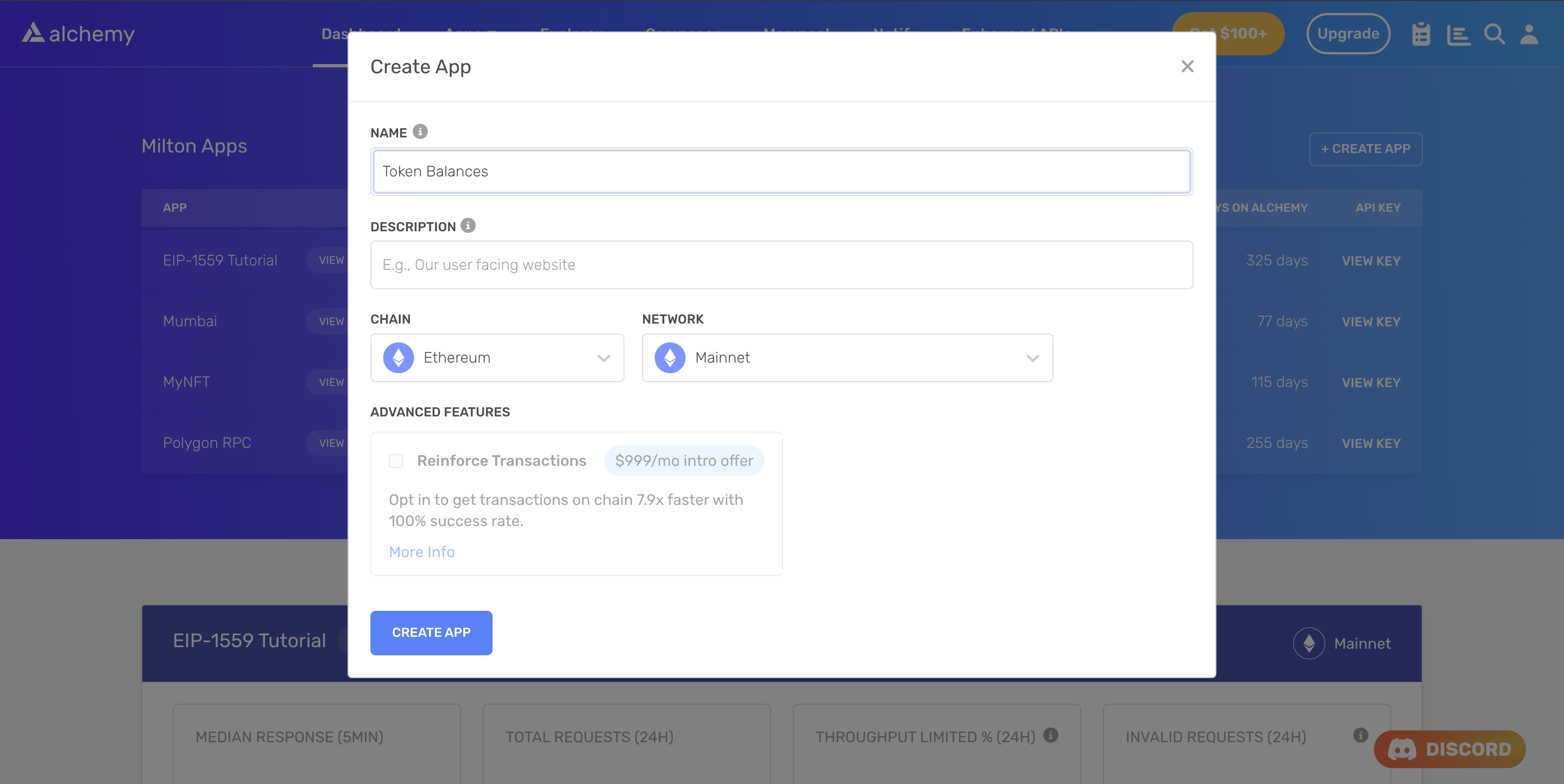
Alchemy's account dashboard where developers can create a new app on the Ethereum blockchain.
Next, navigate to the [Alchemy Dashboard](https://dashboard.alchemy.com/signup) and create a new app.
Make sure you set the chain to Ethereum and the network to Mainnet.
Once the app is created, click on your app's *View Key* button on the dashboard.
Take note of the **HTTP URL**.
The URL will be in this form: `https://eth-mainnet.g.alchemy.com/v2/xxxxxxxxx`
You will need this later.
***
## Step 3: Create a node project
Let's now create an empty repository and install all node dependencies.
To make requests, we will use modern Web3 libraries like Viem or Ethers.js.
```shell Viem
mkdir my-project && cd my-project
npm init -y
npm install --save viem
touch main.js
```
```shell Ethers.js
mkdir my-project && cd my-project
npm init -y
npm install --save ethers
touch main.js
```
This will create a repository named `my-project` that holds all your files and dependencies.
Next, open this repo in your favorite code editor.
We will be writing all our code in the `main.js` file.
## Step 4: Get the event logs
To get the event logs, we will use the [getLogs](/docs/chains/ethereum/ethereum-api-endpoints/eth-get-logs) method. Which takes in an object as a parameter with the properties defined in [parameters](#parameters).
Add the following code to the `main.js` file.
```javascript Viem
import { createPublicClient, http } from 'viem'
import { mainnet } from 'viem/chains'
const apiKey = "<-- ALCHEMY API KEY -->";
const client = createPublicClient({
chain: mainnet,
transport: http(`https://eth-mainnet.g.alchemy.com/v2/${apiKey}`)
})
const main = async () => {
const logs = await client.getLogs({
fromBlock: 0x429d3bn,
toBlock: 0x429d3bn,
address: "0xb59f67a8bff5d8cd03f6ac17265c550ed8f33907",
topics: [
"0xddf252ad1be2c89b69c2b068fc378daa952ba7f163c4a11628f55a4df523b3ef",
"0x00000000000000000000000000b46c2526e227482e2ebb8f4c69e4674d262e75",
"0x00000000000000000000000054a2d42a40f51259dedd1978f6c118a0f0eff078",
],
});
console.log(logs);
};
const runMain = async () => {
try {
await main();
process.exit(0);
} catch (error) {
console.log(error);
process.exit(1);
}
};
runMain();
```
```javascript Ethers.js
import { ethers } from "ethers";
const apiKey = "<-- ALCHEMY API KEY -->";
const provider = new ethers.JsonRpcProvider(`https://eth-mainnet.g.alchemy.com/v2/${apiKey}`);
const main = async () => {
const logs = await provider.getLogs({
fromBlock: "0x429d3b",
toBlock: "0x429d3b",
address: "0xb59f67a8bff5d8cd03f6ac17265c550ed8f33907",
topics: [
"0xddf252ad1be2c89b69c2b068fc378daa952ba7f163c4a11628f55a4df523b3ef",
"0x00000000000000000000000000b46c2526e227482e2ebb8f4c69e4674d262e75",
"0x00000000000000000000000054a2d42a40f51259dedd1978f6c118a0f0eff078"
]
});
console.log(logs);
};
main().catch(console.error);
```
In our `params` here we have specified the `fromBlock` , `toBlock` , `address`, and `topics`. The `fromBlock` and `toBlock` params specify the start and end block numbers to restrict the search by, these are important to specify so we search over the correct blocks. The `address` field represents the address of the contract emitting the log.
`Topics` is an ordered array of data. The first item in the `topics` field is the [*event signature*](/docs/deep-dive-into-eth_getlogs#what-are-event-signatures) of our `Transfer(address,address,uint256)` event. This means we are specifically querying for a Transfer event between address `0x00b46c2526e227482e2ebb8f4c69e4674d262e75` and `0x0054a2d42a40f51259dedd1978f6c118a0f0eff078` (the second and third elements in topics).
To make the request, run the script using the following command or make the request using `cURL`:
```bash bash
node main.js
```
```curl cURL
curl https://eth-mainnet.g.alchemy.com/v2/your-api-key \
-X POST \
-H "Content-Type: application/json" \
--data '{"method":"eth_getLogs","params":[{
"fromBlock": "0x429d3b",
"toBlock": "0x429d3b",
"address": "0xb59f67a8bff5d8cd03f6ac17265c550ed8f33907",
"topics": [
"0xddf252ad1be2c89b69c2b068fc378daa952ba7f163c4a11628f55a4df523b3ef",
"0x00000000000000000000000000b46c2526e227482e2ebb8f4c69e4674d262e75",
"0x00000000000000000000000054a2d42a40f51259dedd1978f6c118a0f0eff078"
]
}],"id":1,"jsonrpc":"2.0"}'
```
If all goes well, you should see an output that looks like this:
```json json
{
"id": 0,
"jsonrpc": "2.0",
"result": [
{
"address": "0xb59f67a8bff5d8cd03f6ac17265c550ed8f33907",
"blockHash": "0x8243343df08b9751f5ca0c5f8c9c0460d8a9b6351066fae0acbd4d3e776de8bb",
"blockNumber": "0x429d3b",
"data": "0x000000000000000000000000000000000000000000000000000000012a05f200",
"logIndex": "0x56",
"removed": false,
"topics": [
"0xddf252ad1be2c89b69c2b068fc378daa952ba7f163c4a11628f55a4df523b3ef",
"0x00000000000000000000000000b46c2526e227482e2ebb8f4c69e4674d262e75",
"0x00000000000000000000000054a2d42a40f51259dedd1978f6c118a0f0eff078"
],
"transactionHash": "0xab059a62e22e230fe0f56d8555340a29b2e9532360368f810595453f6fdd213b",
"transactionIndex": "0xac"
}
]
}
```
The interesting fields to point out here are the "`data`", and "`topics`".
**Topics**
The `topics` field can contain up to 4 topics. The first topic is required and will always contain the *keccak 256* hash of the ***event signature***. The other three topics are optional and typically used for indexing and provide a faster lookup time than using the **data** field described below.
**Data**
The data field is an unlimited field for encoding hex data that is relevant to the specific event. By default if information does not get indexed into the remaining topics field, it will automatically go into the data field. This requires more work for parsing out individual information from the hex string rather than having them as separate indexed topics. However since it has no storage limit it's less expensive in regards to the gas cost for storing data like arrays and strings.
So how do we figure out what all of this means?
We can start by looking at the [ABI reference](/docs/deep-dive-into-eth_getlogs#what-are-abis) for this specific transfer method:
```json json
{
"anonymous": false,
"inputs": [
{
"indexed": true,
"name": "from",
"type": "address"
},
{
"indexed": true,
"name": "to",
"type": "address"
},
{
"indexed": false,
"name": "value",
"type": "uint256"
}
],
"name": "Transfer",
"type": "event"
},
```
Notice that the "`from`" and "`to`" inputs have `"indexed": true`. This means that these addresses will be stored in the `topics` field rather than the `data` field when the event gets fired off. Remember, the first topic is the event signature for this log which means the other two topics are the `from` and `to` addresses (in that order).
However, for the "`value`" input, the `uint256` will instead go into the `data` field since it has `"indexed":false` in the contract ABI.
Since we know the `value` is of type `uint256`we can translate the data `0x12a05f200`to `5,000,000,000`. So this transaction reads: transfer `5,000,000,000` from address `0x00b46c2526e227482e2ebb8f4c69e4674d262e75` to address `0x54a2d42a40f51259dedd1978f6c118a0f0eff078`.
One thing to note is that the values are always specified in the most basic unit, but each contract has a constant called `decimals` which indicates the conversion from the base unit to the more common unit or token, specifying how much you should divide by to get the actual value. In this case, the `decimals` value is 3 so you divide the given value by 10^3, which makes our true amount `5,000,000`. You can see the decimals value for this contract on [Etherscan](https://etherscan.io/address/0xb59f67a8bff5d8cd03f6ac17265c550ed8f33907#readContract).
And that's how you query event logs from the blockchain!