# What is trace_filter?
> Learn what the trace_filter method is, how to use it on EVM blockchains, and test an example use case.
> For the complete documentation index, see [llms.txt](/docs/llms.txt).
# Prerequisites
Before reading this article you should have a clear understanding of [EVM Traces](/docs/reference/what-are-evm-traces).
# What is `trace_filter`?
`trace_filter` is an RPC method exposed by the Openethereum and Erigon [Ethereum clients](https://www.alchemy.com/overviews/execution-layer-and-consensus-layer-node-clients). It allows you to get the traces of multiple transactions in a single request based on the filters provided by you. You can specify the `from` and `to` block numbers, and the `from` and `to` addresses. This is useful for debugging purposes or for monitoring specific addresses.
## **Parameters**
1. `Object` - The filter object
* `fromBlock`: `Quantity` or `Tag` - (optional) From this block.
* `toBlock`: `Quantity` or `Tag` - (optional) To this block.
* `fromAddress`: `Array` - (optional) Sent from these addresses.
* `toAddress`: `Array` - (optional) Sent to these addresses.
* `after`: `Quantity` - (optional) The offset trace number.
* `count`: `Quantity` - (optional) Integer number of traces to return.
## Response
* `array` - Traces of transactions based on the given filters.
# How to use trace\_filter
To use the [trace\_filter](/docs/reference/trace-filter) method you need to be in pay as you go or enterprise tier. [Sign up for Alchemy](https://dashboard.alchemy.com/signup) or [upgrade your account](https://dashboard.alchemy.com/settings/billing).
You can call the `trace_filter` method by passing a filter object as a parameter to it. An example request and response are given below:
## Request
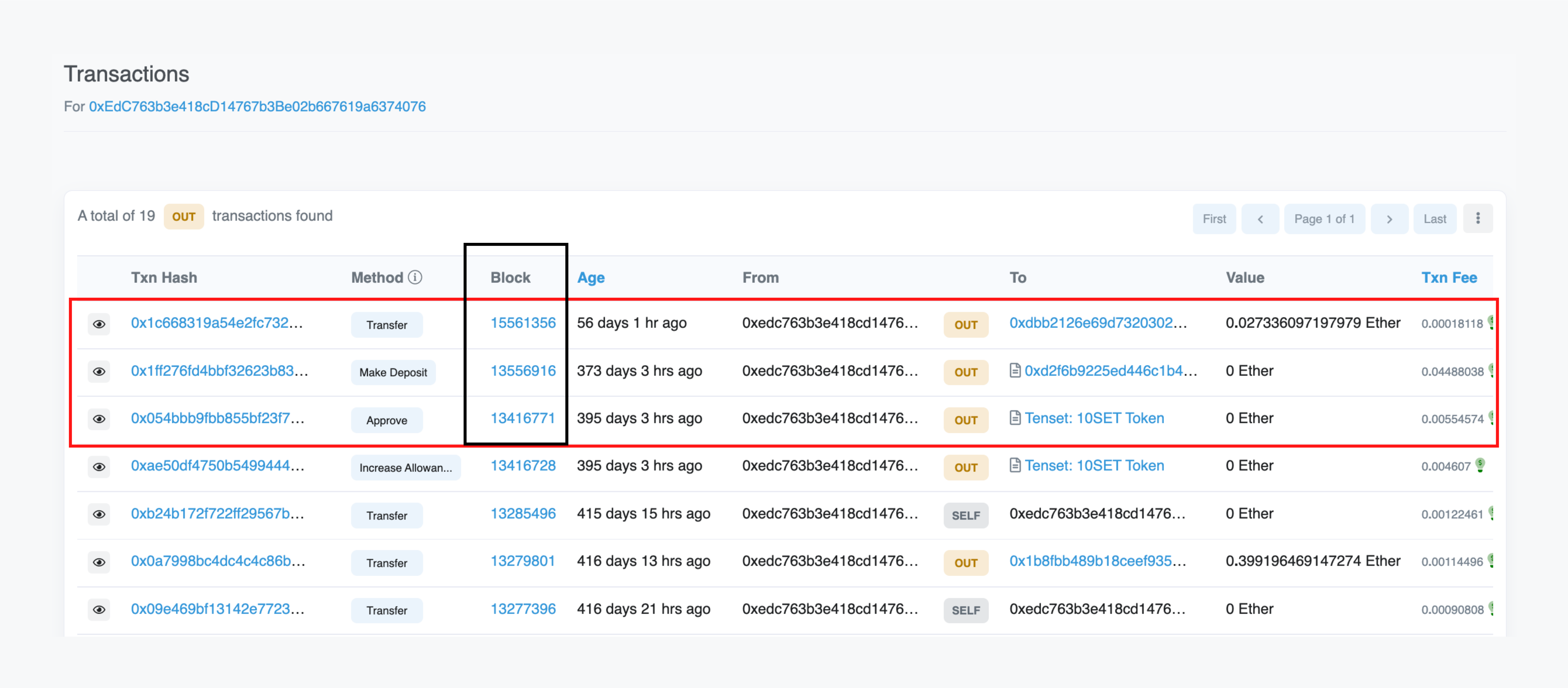
This request will return traces of all the transactions sent by [0xEdC763b3e418cD14767b3Be02b667619a6374076](https://etherscan.io/txs?a=0xEdC763b3e418cD14767b3Be02b667619a6374076\&f=2) address after the block number `0xccb942` (13416770).
```curl cURL
curl https://eth-mainnet.g.alchemy.com/v2/your-api-key/ \
-X POST \
-H "Content-Type: application/json" \
--data '{"method":"trace_filter","params":[{"fromBlock":"0xccb942","toBlock":"latest","fromAddress":["0xEdC763b3e418cD14767b3Be02b667619a6374076"]}],"id":1,"jsonrpc":"2.0"}'
```
```http postman
URL: https://eth-mainnet.g.alchemy.com/v2/your-api-key
RequestType: POST
Body:
{
"jsonrpc":"2.0",
"method":"trace_filter",
"params":[{"fromBlock":"0xccb942","toBlock":"latest","fromAddress":["0xEdC763b3e418cD14767b3Be02b667619a6374076"]}],
"id":1
}
```
```javascript ethers
const ethers = require("ethers");
(async () => {
const provider = new ethers.providers.JsonRpcProvider("https://eth-mainnet.g.alchemy.com/v2/your-api-key/");
const trace = await provider.send("trace_filter", [
{
"fromBlock": "0xccb942",
"toBlock": "latest",
"fromAddress": ["0xEdC763b3e418cD14767b3Be02b667619a6374076"],
},
]);
console.log(trace);
})();
```
```python web3py
from web3 import HTTPProvider
client = HTTPProvider('https://eth-mainnet.g.alchemy.com/v2/your-api-key/')
result = client.make_request('trace_filter', [{
"fromBlock": "0xccb942",
"toBlock": "latest",
"fromAddress": ['0xEdC763b3e418cD14767b3Be02b667619a6374076'],
}])
print(result)
```
## Response
```json response
[
{
"action": {
"from": "0xedc763b3e418cd14767b3be02b667619a6374076",
"callType": "call",
"gas": "0x8462",
"input": "0x095ea7b30000000000000000000000007a250d5630b4cf539739df2c5dacb4c659f2488dffffffffffffffffffffffffffffffffffffffffffffffffffffffffffffffff",
"to": "0x7ff4169a6b5122b664c51c95727d87750ec07c84",
"value": "0x0"
},
"blockHash": "0x351e7c06ec010c8f7e7358eb580238dd23e1e129be96822aa93ebb6da08558e6",
"blockNumber": 13416771,
"result": {
"gasUsed": "0x6009",
"output": "0x0000000000000000000000000000000000000000000000000000000000000001"
},
"subtraces": 0,
"traceAddress": [],
"transactionHash": "0x054bbb9fbb855bf23f755e548c7409f45fc5eff8a824b2ad06380bc038d7b049",
"transactionPosition": 54,
"type": "call"
},
{
"action": {
"from": "0xedc763b3e418cd14767b3be02b667619a6374076",
"callType": "call",
"gas": "0x7063a",
"input": "0x2440fdc2000000000000000000000000edc763b3e418cd14767b3be02b667619a6374076000000000000000000000000000000000000000000000000000000000000000600000000000000000000000000000000000000000000003753ab94a123aa7960",
"to": "0xd2f6b9225ed446c1b445ac0656c8ccc97d096fb8",
"value": "0x0"
},
"blockHash": "0xa6c8748136b5d22aabff34f71357f85911eddc5e772258f48d7d14fe30d2f87f",
"blockNumber": 13556916,
"result": {
"gasUsed": "0x4926c",
"output": "0x00000000000000000000000000000000000000000000000000000000000009f7"
},
"subtraces": 1,
"traceAddress": [],
"transactionHash": "0x1ff276fd4bbf32623b83653eb07352f76c5adf258d42190693d46669168b227a",
"transactionPosition": 237,
"type": "call"
},
{
"action": {
"from": "0xedc763b3e418cd14767b3be02b667619a6374076",
"callType": "call",
"gas": "0x0",
"input": "0x",
"to": "0xdbb2126e69d73203024002f427758557d2994c5e",
"value": "0x611e091b07f64f"
},
"blockHash": "0x47b76a1db0bc39efc5f3fe9b2fe7975c4fbaa7de7f767a2cd4c345eac18a1e99",
"blockNumber": 15561356,
"result": {
"gasUsed": "0x0",
"output": "0x"
},
"subtraces": 0,
"traceAddress": [],
"transactionHash": "0x1c668319a54e2fc73241ae6f930deb824a34e48738e79cd8f5391e3c9ce0154f",
"transactionPosition": 98,
"type": "call"
}
]
```
As you can see that only three transactions are sent by this address after the block number `13416770`, that's why only three traces are returned in the response which are traces of these three transactions.
# Use Cases
The `trace_filter` method is useful for filtering traces based on certain criteria. You can use it to find traces that involve a particular address or to find traces that involve a particular contract.
An example is given above in the ["How to use trace\_filter"](#how-to-use-trace_filter) section where we filter the traces of all the transactions sent by an address after a particular block number.
# Conclusion
In conclusion, the `trace_filter` method is a valuable tool that can be used for monitoring the on-chain activity of addresses.