# Authentication with UI components
> How to use our pre-built authentication component in your React app
> For the complete documentation index, see [llms.txt](/docs/llms.txt).
Wallet APIs allows you to use pre-built, highly customizable UI components to handle authenticating your users. These components provide flexibility to:
* Use the pre-built [modal](#modal-auth) or [embed](#embedded-auth) the auth card directly in your app
* Choose from [multiple authentication methods](#available-authentication-methods)
* Customize [authentication method UI](#customize-authentication-ui)
* Customize [theme](/docs/wallets/react/customization/theme)
Tailwind CSS is a required dependency for using Wallet APIs UI
components. However, Wallet APIs hooks function independently and do
not require Tailwind.
## Available Authentication Methods
Several authentication methods are available for you to implement with pre-built UI components:
* [Email OTP](/docs/wallets/authentication/login-methods/email-otp) - One-time password sent via email
* [Email Magic Link](/docs/wallets/authentication/login-methods/email-magic-link) - Authentication links sent via email
* [Social Login](/docs/wallets/authentication/login-methods/social-login) - Authentication with providers like Google and Facebook
* [Custom Social Providers](/docs/wallets/react/login-methods/social-providers) - Add custom OAuth providers via Auth0
* [Passkey Signup](/docs/wallets/react/login-methods/passkey-login) - Create accounts with passkeys
* [Passkey Login](/docs/wallets/react/login-methods/passkey-login) - Authenticate with existing passkeys
* [Multi-Factor Authentication](/docs/wallets/react/mfa/setup-mfa) - Add an additional verification layer after initial login using an authenticator app
* [EOA Login](/docs/wallets/react/login-methods/eoa-login) - Bring in your own EOAs
Each authentication method page includes specific configuration options and examples for both pre-built UI components and custom UI implementations.
**Multi-Factor Authentication (MFA)**\
If your users have an authenticator app (TOTP) set up, the UI components will automatically prompt them for their 6-digit code after they complete any primary login method (e.g., Email OTP, Email Magic Link, or Social Login). No extra configuration is required in the UI component – just [enable MFA](/docs/wallets/react/mfa/setup-mfa) for your users.
## Modal auth
Assuming your application has been [set up](/docs/wallets/react/quickstart), using UI components is the easiest way to authenticate users. All you have to do is leverage the [`useAuthModal`](/docs/wallets/reference/account-kit/react/hooks/useAuthModal) hook and provide users a CTA to open the modal.
```tsx twoslash
import React from "react";
import { useAuthModal } from "@account-kit/react";
export default function MyPage() {
const { openAuthModal } = useAuthModal();
return ;
}
```
That's it! When the user clicks that button, the modal will open and they can complete authentication. Once they are authenticated, you can use the [`useAccount`](/docs/wallets/reference/account-kit/react/hooks/useAccount) hook to get the logged in user's SCA address.
**Want to display a loading state during authentication?**
For authentication with redirects in a modal, you may want to add a loading state when users are waiting for authentication to complete.
To do this, manage the loading state directly using the hooks, as shown below. In embedded authentication and non-redirect flows, such as passkey authentication, the loading state is handled automatically.
```tsx twoslash
import { useAuthModal, useSignerStatus } from "@account-kit/react";
import { useEffect } from "react";
const { openAuthModal } = useAuthModal();
const { isAuthenticating } = useSignerStatus();
useEffect(() => {
if (isAuthenticating) {
openAuthModal();
}
}, [openAuthModal, isAuthenticating]);
```
## Embedded auth
The body of the Auth Modal is also exported for you to use directly in your application. This is useful if you don't want a modal flow for login and want a standalone page using the card.
```tsx twoslash
import React from "react";
import { AuthCard } from "@account-kit/react";
export default function MyLoginPage() {
return (
);
}
```
That's it! The user can now input their credentials and complete login. Once they are authenticated, you can use the [`useAccount`](/docs/wallets/reference/account-kit/react/hooks/useAccount) hook to get the logged in user's SCA address.
## Customize authentication UI
When rendering the authentication component to your users, it's possible to customize the various sections a user will see as well as the content of the modal.
See the [theming guide](/docs/wallets/react/customization/theme) for details on configuring your UI components.
**How does the UI config work?**
* `auth` property accepts a `sections` object
* `sections` object is an array of arrays representing the various sections in descending order, each section (element in the outer array) separated by a divider in the UI
* each item within a section is an `AuthTypes` objects containing configuration parameters for that authentication method.
**The following [`AuthTypes`](https://github.com/alchemyplatform/aa-sdk/blob/main/account-kit/react/src/components/auth/types.ts)
can be passed into sections:**
### Email
This adds an email login to a section. For detailed information on email authentication, see [Email OTP](/docs/wallets/authentication/login-methods/email-otp) and [Email Magic Link](/docs/wallets/authentication/login-methods/email-magic-link) pages.
### Passkey
This adds a passkey login method to a section. For detailed information on passkey authentication, see [Passkey Login](/docs/wallets/react/login-methods/passkey-login) and [Passkey Signup](/docs/wallets/react/login-methods/passkey-login) pages.
### External wallets
This adds an external wallet login method to a section. This allows users to connect to your app with existing EOAs via browser extension or WalletConnect.
```ts
type ExternalWalletsAuthType = {
type: "external_wallets";
// if this is undefined, wallet connect will not be displayed
walletConnect?: WalletConnectParameters;
};
```
### Social
This adds social authentication methods to a section. For detailed information on social authentication, see [Social Login](/docs/wallets/authentication/login-methods/social-login) and [Custom Social Providers](/docs/wallets/react/login-methods/social-providers) pages.
### Example
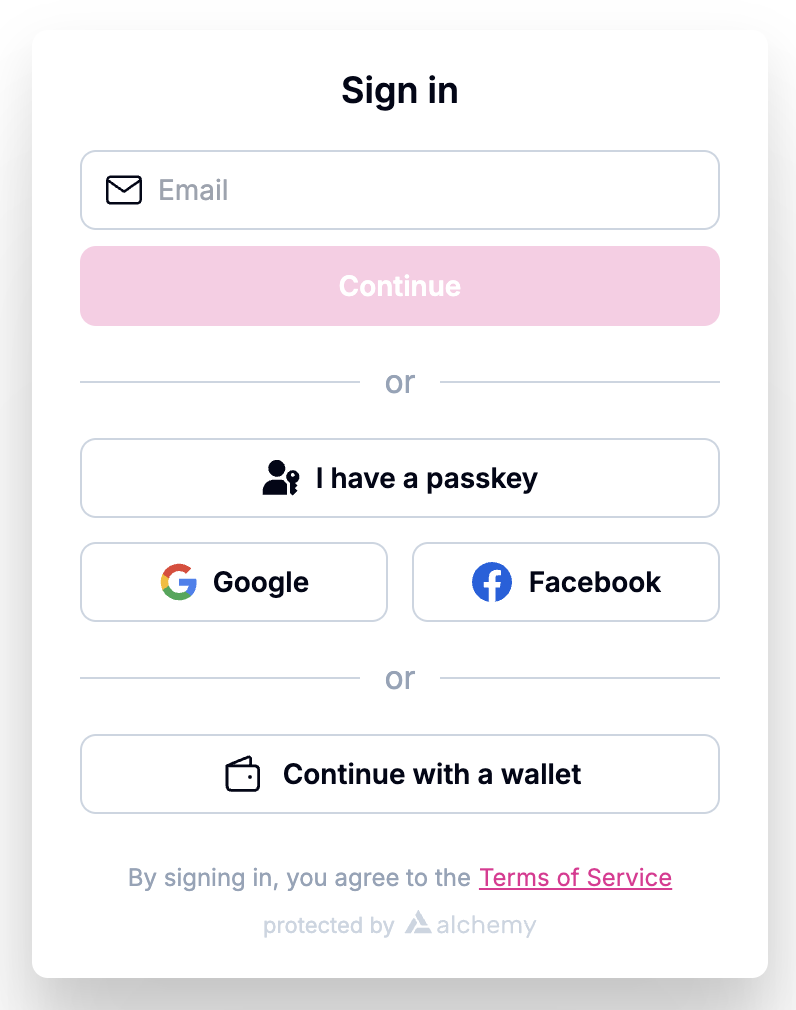
Here's an example UI configuration which adds 3 sections to the auth modal. The first section contains an email auth, the second section is for passkey login and 2 social auth logins (google and facebook), and the third section is external wallets.
```ts twoslash
import { AlchemyAccountsUIConfig, createConfig } from "@account-kit/react";
import { sepolia, alchemy } from "@account-kit/infra";
const uiConfig: AlchemyAccountsUIConfig = {
illustrationStyle: "outline",
auth: {
sections: [
[{ type: "email" }],
[
{ type: "passkey" },
{ type: "social", authProviderId: "google", mode: "popup" },
{ type: "social", authProviderId: "facebook", mode: "popup" },
],
[
{
type: "external_wallets",
walletConnect: { projectId: "your-project-id" },
},
],
],
addPasskeyOnSignup: false,
},
};
export const config = createConfig(
{
transport: alchemy({ apiKey: "your-api-key" }),
chain: sepolia,
},
uiConfig,
);
```
This example would output a modal similar to this image:
## Need More Control?
If you need complete control over the user experience, you can implement your own custom UI using Wallet APIs hooks. See the [Authentication with React Hooks](/docs/wallets/react/react-hooks) page and the individual authentication method pages for detailed implementations.
 ## Need More Control?
If you need complete control over the user experience, you can implement your own custom UI using Wallet APIs hooks. See the [Authentication with React Hooks](/docs/wallets/react/react-hooks) page and the individual authentication method pages for detailed implementations.
## Need More Control?
If you need complete control over the user experience, you can implement your own custom UI using Wallet APIs hooks. See the [Authentication with React Hooks](/docs/wallets/react/react-hooks) page and the individual authentication method pages for detailed implementations.