

Gas sponsorship policies allow you to set limits, allowlist, and custom rules to give you precise control over what transactions get sponsored.
Use it to:
- Protect your budget with hard spending limit
- Prioritize high-value users and actions
- Prevent abuse with allowlists, blocklists, and custom logic
You can configure the same policy logic in two ways:
- Dashboard: Create or edit a Gas Manager policy in the dashboard
- Admin API: Create or update policies programmatically with the Gas Manager Admin API
Most teams start in the dashboard, then move to API-based management for automation.
These limits are ideal for growth campaigns, onboarding credits, and controlled rollouts.
Basic spending and access limits are supported out of the box and you can combine multiple controls in one policy. The types of supported rules depend on the policy type.
Gas Sponsorship and Onchain Paymaster
Both EVM policy types support the same rules.
- Spending limits — cap total spend, spend per sender, and spend per transaction. Use these to control cost exposure.
- Transaction limits — cap total count and count per sender. Use these to limit how many transactions a policy sponsors.
- Access control — set a sender allowlist or blocklist to restrict which addresses the policy sponsors.
- Custom rules — add a webhook URL so your server can approve or reject sponsorship in real time, and choose whether to sponsor on webhook error or timeout. See custom rules.
Solana Fee Sponsorship
- Spending limits — cap total spend and spend per transaction.
- Transaction limits — cap total count.
See Solana sponsorship for the Solana-specific request options.
ERC-20
ERC-20 policies configure which tokens to accept and how users pay, instead of spend and access controls. In the editor, networks for an ERC-20 policy come from the tokens you enable: turn on a token for a chain to sponsor that chain. There is no separate network selector on the editor.
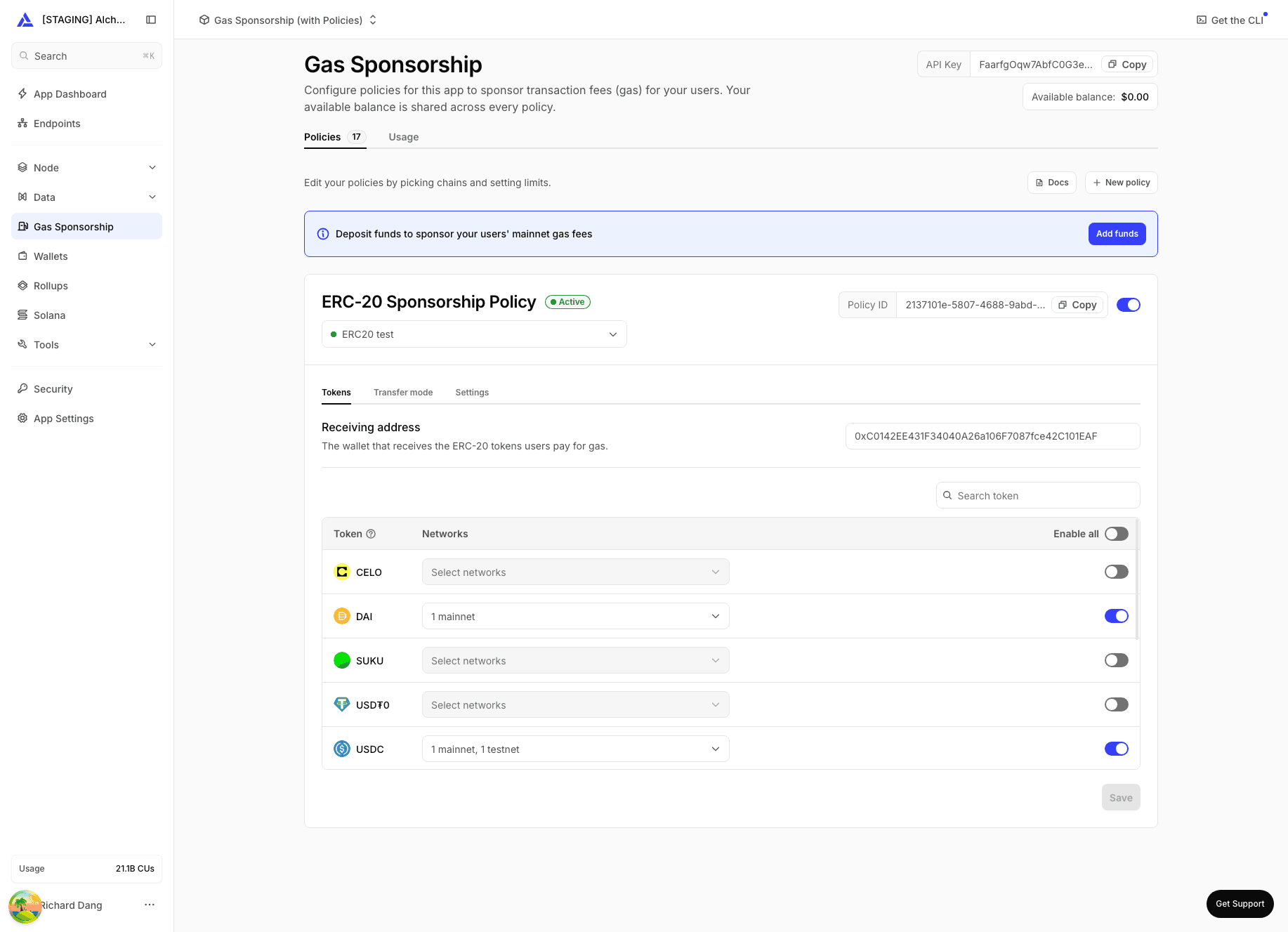
- Tokens — choose which ERC-20 tokens to accept on which chains, and set a price multiplier to add a margin over the token's gas value.
- Transfer mode — choose whether the user pays the token after the transaction executes (recommended) or before. After is recommended because it doesn't require an onchain allowance ahead of the transaction. See pay gas with any token.
- Settings — set the recipient address that receives the tokens.
For advanced use cases, add a webhook so your server can approve or reject sponsorship requests in real time.
Examples:
- Sponsor only swaps
- Sponsor only transactions that touch your contracts
- Sponsor only high-ROI users (for example, power users)
- Sponsor users with proof-of-humanity checks
When a sponsorship request is made, Gas Manager sends a POST request to your webhook.
Your server evaluates the request and returns whether to approve sponsorship.
Request payload
{
  "userOperation": {},
  "policyId": "",
  "chainId": "",
  "webhookData": ""
}
Payload fields:
userOperation: UserOperation payload (shape depends on EntryPoint version)policyId: Policy ID receiving the sponsorship requestchainId: Chain ID for the requestwebhookData(optional): Additional app data, such as user attestations
Expected webhook response
Return HTTP 200 and:
{
  "approved": true
}
Set approved to:
trueto sponsor gasfalseto reject sponsorship
In your policy's Custom Rules section, set:
webhookUrl(required): Endpoint Gas Manager calls for eligibilityapproveOnFailure(required, defaultfalse): Iftrue, sponsorship is approved when webhook errors or times out
In the Admin API, this configuration is represented as:
{
  "webhookRules": {
    "webhookUrl": "https://your-server.com/sponsor-gas",
    "approveOnFailure": false
  }
}